
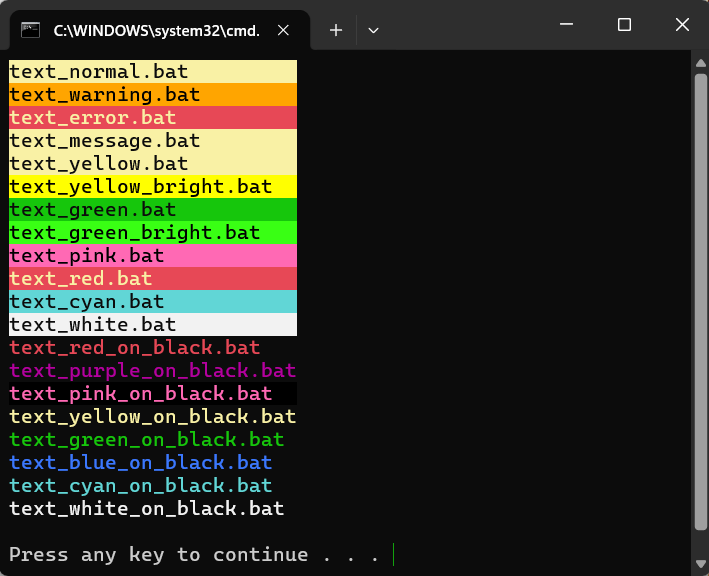
A collection of DOS batch scripts to display text messages in various colours
Windows Versions
Tested on Windows 10 and Windows 11.
There are two versions available. They do the same thing. You might prefer the one with separate files, or the one with just one file.
This version uses separate files, one for each colour
Download
Example Use
C:\> text_red.bat “this is text on a red background”
This version uses just one script
Example Use:
C:\> text_yellow.bat RED “this is text on a red background”
Weird Behind The Scenes Stuff – you dont need to understand this, but techie people might be interested.
The scripts use a non standard ESC / Escape) character. This is a command character that tells DOS to do something funky rather than a character that is meant to be displayed.
In Windows Notepad it looks like this [?]
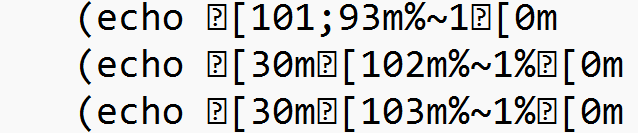
In Notepad++ it looks like this – you might need to tweak the settings to see it

Ideas For Improvement
– support for non black background
The scripts presume the background colour is black but your DOS shell might use a different colour. The scripts could be enhanced to get the default background colour from the Windows registry (it is not possible to get the background colour of the current shell session). If that is done – the various references to “black” would no longer make sense so maybe add a new version that uses “BACKGROUND” instead of “BLACK”. I did a recent post on how to get and restore the background colour so I just need to use that same technique on these scripts
Scott Hollows
- Oracle & Delphi software developer based in Perth, Western Australia
- Australian Oracle User Group – National Committee Member
- Australian Delphi User Group – National Committee Member


Leave a Reply