
Use this FireMonkey panel trick to change the color of a Delphi FireMonkey panel or make a FireMonkey panel transparent
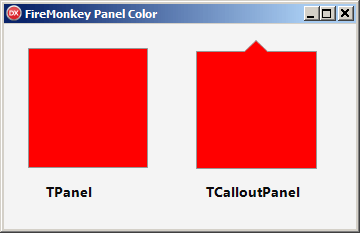
I have seen some complex solutions to achieve this, but this is really quite easy to do. You just need one line of code. Well, two lines if you count the USES
Change the panel color
uses FMX.objects;   // from memory, I dont think you used to need this, but it is required in Delphi 12.1 and probably older versions as well

(Panel1.Controls[0] as TShape).Fill.Color := TAlphaColorRec.Red;
One line of code and we are done – BOOM
How does it work ?
This technique works because all FireMonkey panels own a TShape (usually a TRectangle) that covers the inside of the panel. In the above example, we are changing the color of that TShape to red
This also works for other panel variants that I have tried such as TCalloutPanel
More robust code
It ia possible (although I have never seen it) that Delphi might remove the TShape. So, lets modify the code to be more paranoid by first making sure that a TShape exists (hopefully it is the right one)
  if   (Panel1.ControlsCount >= 1)
   and (Panel1.Controls[0] is TShape)
  then
       (Panel1.Controls[0] as TShape).Fill.Color := TAlphaColorRec.Red;  // uses System.UITypes
Want more – lets make the panel transparent
Now that you know the magic trick of the TPanel guts being a TShape, you can go further and manipulate the shape to make the panel transparent … like this
  if   (Panel1.ControlsCount >= 1)
   and (Panel1.Controls[0] is TShape)
  then
       (Panel1.Controls[0] as TShape).visible := FALSE;
Is this Future Proof ?
No – This is not guarenteed to work in future as Embaradero could remove this handy little TShape #0 feature. However, I think it is stable and I expect it to work in the long term (fingers crossed)
Alternatives
If you dont like that solution, here are some alternatives
- Add a TRect to the panel to show the color that you want. Thats pretty much the same technique that I use above, but you will feel more in control because you created it.
- Use Delphi Styles.
+1 this post
Please help get this blog listed on DelphiFeeds by +1 voting here on DelphiFeeds
and also vote on BeginEnd. Thank you
About Me
- Oracle & Delphi software developer based in Perth, Western Australia
- Australian Delphi User Group – President
- Australian Oracle User Group – WA Committee Member
-
Available to do remote presentations to user groups on Delphi and Oracle topics
 |
 |
 |


 Scott Hollows - One Line At A Time
Leave a comment